
Pixelcut Alternative: 6 Best Free & Paid Photo Editing & Restoration Tools in 2026
Looking for a Pixelcut alternative? Compare the 6 best free and paid tools for background removal, e-commerce product photos, and photo restoration without paywalls.
Pixelcut has gained widespread popularity among mobile marketplace sellers and small business merchants seeking automated product cutouts, AI shadow synthesis, and rapid background removal. With over 70 million sellers creating visual content on its platform and more than 200,000 businesses using its services, Pixelcut is undeniably a capable e-commerce photography app. However, strict export limits and paywalled features on its free plan—paired with subscriptions priced at $10 per month (or $8 per month billed yearly at $96 per year) for Pixelcut Pro and $30 per month ($24 per month billed yearly at $288 per year) for Pixelcut Business—have prompted many creators to look for an accessible pixelcut alternative.
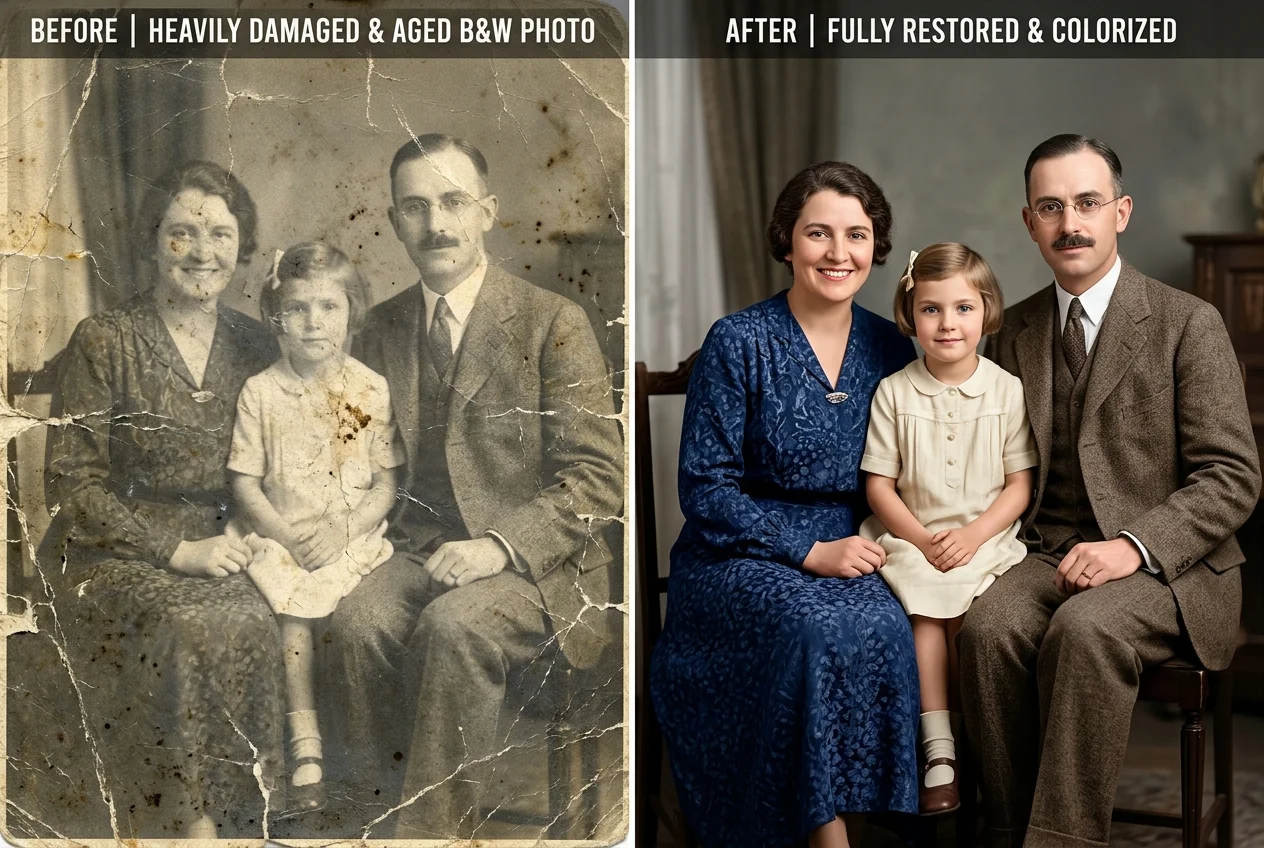
More importantly, creative workflows often require far more than simple retail merchandise cutouts. When working with family portraits, historical archives, or personal snapshots, creators frequently encounter physical scratches, camera flash reflections, or faded monochrome prints. Pixelcut is engineered specifically as a commercial product staging tool; it does not offer optical defect reconstruction, archival scratch inpainting, or authentic photographic colorization. When a physical print is creased, cutting out the subject against a stark white backdrop leaves the underlying surface damage untouched. Finding a specialized pixelcut alternative that restores authentic photographic textures or provides unmetered browser editing is essential for photographers, archivists, and everyday creators.
Depending on whether your workflow prioritizes photographic defect repair, comprehensive social marketing graphics, or developer-friendly API cutouts, various dedicated alternatives exist. For optical flash glare removal and vintage print repair without monthly subscriptions, CrispFix serves as a completely free pixelcut alternative. For mobile marketplace product photography with automated drop shadows, PhotoRoom acts as a direct pixelcut alternative. For complete marketing collateral and brand kits, Canva delivers a versatile pixelcut alternative. For single-purpose automated subject segmentation with a mature API, remove.bg provides a high-throughput pixelcut alternative, while Photopea operates as a zero-cost pixelcut alternative for manual layer editing in your browser.
Note: This site operates CrispFix and we've aimed to evaluate all tools objectively.
Key Takeaways (TL;DR)
- Best for Archival Defect Repair & Optical Glare Removal: CrispFix repairs scratched vintage family prints, removes eyeglasses flash reflections, and restores authentic textures as a zero-cost pixelcut alternative without stripping original scene backgrounds.
- Best for Direct Mobile E-Commerce & Retail Catalog Staging: PhotoRoom provides industry-leading product cutout boundaries, automated studio shadows, and pre-formatted marketplace canvas dimensions as a direct pixelcut alternative.
- Best for Multi-Channel Social Graphics & Team Collaboration: Canva pairs drag-and-drop graphic layouts with a massive template ecosystem and team brand kits as a comprehensive pixelcut alternative.
- Best for Automated Developer Cutouts & API Integration: remove.bg offers lightning-fast background segmentation algorithms and battle-tested API throughput as an efficient pixelcut alternative for developer pipelines.
- Best for In-Browser Layered PSD Editing: Photopea delivers full layer masks, selection brushes, and native Photoshop PSD compatibility directly inside modern web browsers as a free pixelcut alternative without subscription fees.
- Benchmark for Mobile E-Commerce & Product Visuals: Pixelcut remains an excellent benchmark for mobile sellers who need rapid product backdrops, bulk editing, and virtual studio lighting if your budget covers its monthly subscription.
Pixelcut Alternatives Feature & Pricing Comparison
The table below contrasts free allowances, core strengths, supported platforms, and practical use cases across each pixelcut alternative:
| Tool | Free Tier Allowance | Best Strength | Supported Platforms | Ideal Use Case |
|---|---|---|---|---|
| CrispFix | 100% free; unmetered web processing; no watermarks | Optical glare removal & scratch inpainting | Web (All browsers) | Restoring damaged portraits & vintage family prints |
| PhotoRoom | Watermarked exports; basic resolution limits | E-commerce shadow templates & batch staging | Web, iOS, Android, Shopify | High-volume online marketplace listings |
| Canva | 1.6M+ templates; 5 GB storage; 20 AI uses | Massive template catalog & social scheduling | Web, iOS, Android, Desktop | Collaborative marketing collateral & banners |
| remove.bg | 1 free credit; 0.25 MP preview downloads | Precision edge cutout & developer REST API | Web, Desktop, API, Mobile | High-throughput batch cutout automation |
| Photopea | 100% free with ads; full layer workspace | Native PSD compatibility & layer mask control | Web (All browsers) | Advanced Photoshop-style manual photo retouching |
| Pixelcut (Benchmark) | $0 Free tier; limited cutouts & upscales | AI product photos & automated shadow synthesis | Web, iOS, Android | Mobile-first e-commerce sellers & product imagery |
(Note: All pricing, storage quotas, and feature tiers verified against official documentation as of September 2026).
Detailed Reviews: The Top 6 Pixelcut Competitors
1. CrispFix — Best for Archival Defect Restoration & Optical Glare Removal
Commercial background erasers treat every image problem as an object isolation task. When a vintage family photograph has tears across facial details or a portrait suffers from blinding flash reflections, isolating the silhouette against a clean background does not fix the underlying photographic damage. In contrast, CrispFix operates as an optical restoration pixelcut alternative engineered specifically to reconstruct lost textures using deep neural inpainting.
Rather than deleting your surrounding image context, CrispFix provides dedicated optical neural models that eliminate flash reflections and reconstruct authentic eye details beneath spectacle lenses. For archival projects, historians and families rely on its old photo restoration engine to repair paper tears, folding creases, and surface dust on antique prints without manual clone stamping. Furthermore, its built-in AI photo colorizer enables creators to colorize photo archives and colorize image collections with authentic historical tones. For monochrome conversions, CrispFix also offers a dedicated black and white converter for photographers who want to make image black and white with balanced tonal contrast. As an unmetered browser-based pixelcut alternative, CrispFix processes images without software installations or watermarked downloads.
- Where it shines: Specialized neural networks for eyeglasses glare elimination, lens reflection cleanup, and physical scratch inpainting; high-contrast 1-bit silhouettes via convert image to pure black and white online; fast bulk grayscale conversion; 100% free web access without accounts or watermarks; preserves authentic photo backgrounds.
- Where Pixelcut is better: Pixelcut offers dedicated commercial product staging features, such as automated drop shadow synthesis, AI studio backdrops, and bulk batch editing across hundreds of e-commerce files that CrispFix does not provide.
- Pricing: 100% free web utility with instant processing, no watermarks, and direct full-resolution downloads.
- Verdict: Choose CrispFix as your pixelcut alternative whenever your goal is repairing physical photo defects, removing camera flash reflections, or restoring antique family prints rather than staging online merchandise.
2. PhotoRoom — Best Direct Mobile & E-Commerce Catalog Alternative
For merchants selling across Depop, Poshmark, eBay, or Shopify, PhotoRoom stands out as the closest direct PhotoRoom alternative to Pixelcut. Both applications target mobile-first entrepreneurs who require rapid studio lighting and clean cutouts without hiring a professional photographer.
Where PhotoRoom particularly excels as a pixelcut alternative is its sophisticated edge boundary recognition and realistic contact shadow synthesis. Its models generate natural drop shadows, floating shadows, and ambient reflections that anchor products realistically onto custom backgrounds. PhotoRoom also includes pre-configured canvas dimensions for major online marketplaces, making it a reliable pixelcut alternative for streamlining multi-channel listing preparation.
- Where it shines: Highly consistent boundary extraction on complex product edges; realistic automated shadow generation (drop, floating, ambient); intuitive mobile batch editing tailored for marketplace sellers in PhotoRoom.
- Where Pixelcut is better: Pixelcut provides broader prompt-driven generative fill tools, integrated AI video background removal, and virtual AI actors for promotional video ads.
- Pricing: Free tier provides standard cutouts but enforces visible watermarks on exports; PhotoRoom Pro costs $9.99/month ($89.99/year) for unlimited high-resolution exports, batch processing, and generative AI backgrounds.
- Verdict: Select PhotoRoom as a direct pixelcut alternative if your primary objective is high-converting e-commerce product staging with realistic contact shadows.
3. Canva — Best All-in-One Design Suite with Marketing Templates
When production demands extend beyond isolated product cutouts into full marketing collateral, Canva serves as a powerful Canva alternative to single-purpose cutout tools. While Pixelcut focuses on mobile product staging, Canva provides a complete cloud-based visual communication suite.
As an all-in-one pixelcut alternative, Canva allows creators to strip image backgrounds with a single click and immediately place the isolated subject into multi-page brochures, promotional flyers, or Instagram stories. Distributed teams benefit from centralized brand kits, shared typography libraries, and built-in social media scheduling tools, making Canva an effective pixelcut alternative for multi-format publishing.
- Where it shines: Industry-leading catalog of over 1.6M free and 3.6M Pro templates; seamless team collaboration with locked brand assets; direct scheduling to major social media channels in Canva.
- Where Pixelcut is better: Pixelcut is substantially faster for automated mobile product staging, offering specialized virtual shadows and AI product scenes designed strictly for e-commerce listings.
- Pricing: Free tier includes core design tools, 5 GB cloud storage, and 20 lifetime AI uses (Background Remover requires Pro); Canva Pro costs $180/year ($15/month) for an individual; Canva Business is $250/user/year.
- Verdict: Choose Canva as your pixelcut alternative if you need a collaborative graphic design platform where background removal is simply one step in publishing marketing campaigns.
4. remove.bg — Best Dedicated Automated Cutout Tool & Developer API
For teams seeking single-purpose background segmentation without extraneous design modules, remove.bg represents the developer gold standard. Engineered specifically for automated subject extraction, it operates as a streamlined pixelcut alternative for developers and catalog managers.
The platform excels at isolating challenging silhouettes, including fine strands of hair, animal fur, and semi-transparent glassware. Through its robust REST API and native integrations for Figma, Photoshop, WooCommerce, and Zapier, remove.bg connects directly into automated backend asset ingestion pipelines as an efficient pixelcut alternative for commercial stores.
- Where it shines: Fast and dependable edge segmentation accuracy; mature developer API with enterprise-grade uptime; extensive third-party platform integrations in remove.bg.
- Where Pixelcut is better: Pixelcut provides a complete creative visual editor with generative backdrops, text styling, and e-commerce templates that remove.bg intentionally omits.
- Pricing: Free accounts include 1 full-resolution credit and unlimited low-resolution preview downloads (up to 0.25 megapixels); monthly subscriptions start at $9.00/month for 40 credits ($0.225 per image), with pay-as-you-go credit packs available at $0.20 to $1.99 per image.
- Verdict: Turn to remove.bg as an automated pixelcut alternative whenever you require high-throughput boundary segmentation connected directly to your website or internal workflow.
5. Photopea — Best In-Browser Layer & Mask Editor (Zero Cost)
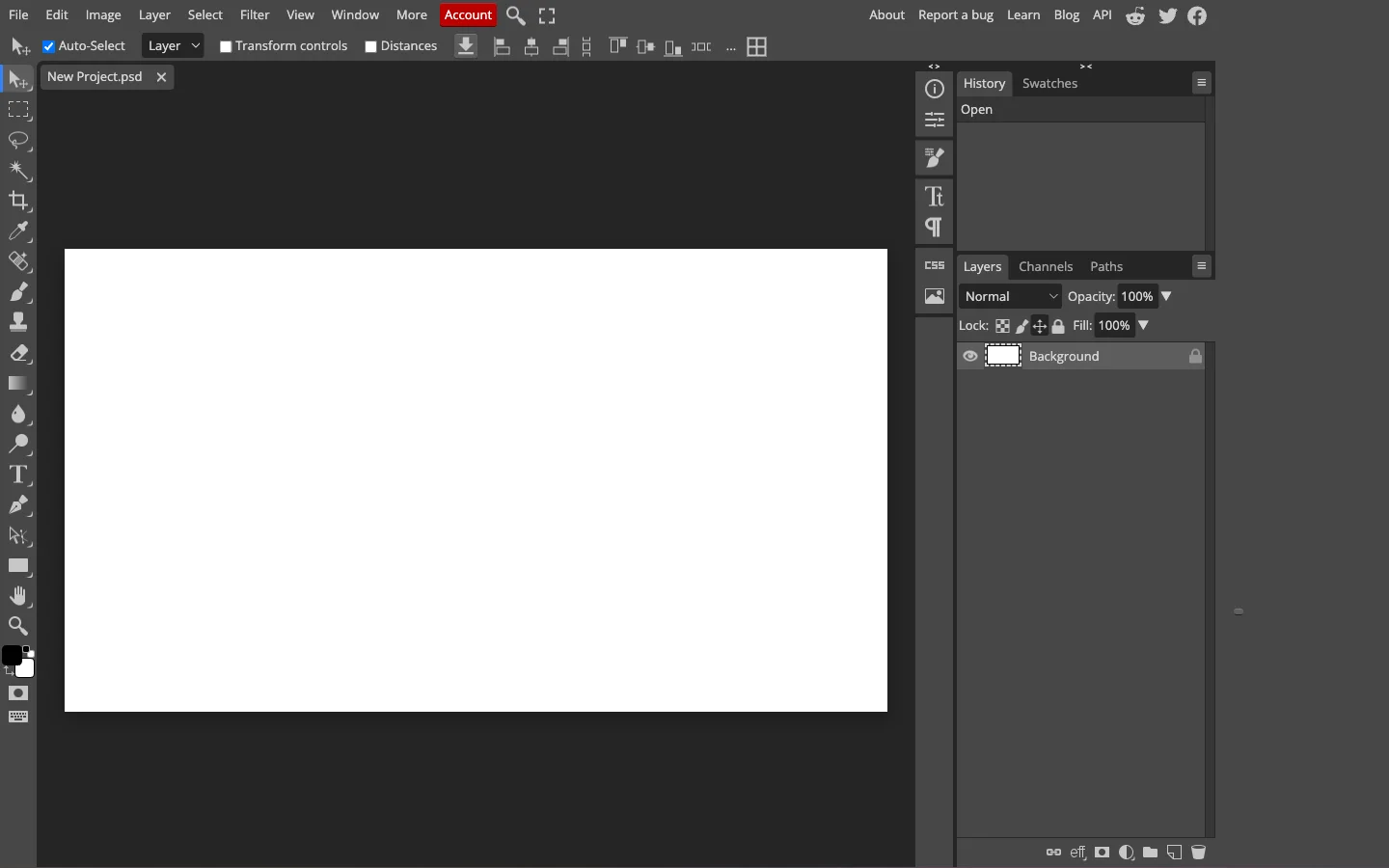
Creators who find automated mobile apps restrictive often desire fine-grained control over selection masks, layers, and color curves. If you need to open native PSD files or make non-destructive adjustments, Photopea offers a desktop-grade pixelcut alternative directly inside your web browser.
Developed by Ivan Kutskir, Photopea runs entirely in local browser memory without uploading raw images to remote servers. Supporting PSD, AI, and Sketch formats, it provides selection brushes, layer masks, blend modes, and clone stamping without recurring subscription fees, acting as a practical pixelcut alternative for manual retouchers.
- Where it shines: Comprehensive layer-based editing environment with adjustment layers, smart objects, and vector paths; native PSD compatibility; 100% free tool access without mandatory user accounts in Photopea.
- Where Pixelcut is better: Pixelcut is far easier and faster for non-technical users who want instant, automated AI background replacements without manually adjusting selection tolerances or layer masks.
- Pricing: 100% free with sidebar display advertisements; Premium ad-free subscription costs $5/month ($40/year), increasing history states from 30 to 60 steps and providing 5 GB of Peadrive cloud storage.
- Verdict: Adopt Photopea as a zero-cost pixelcut alternative when your creative projects demand detailed layer manipulation, custom masking, and full Photoshop file compatibility.
6. Pixelcut (Reference Benchmark) — The AI Product Photography Benchmark

To conduct a balanced software evaluation when researching a pixelcut alternative, it is helpful to examine why Pixelcut has become a staple for over 70 million sellers. The platform has tailored its generative toolset specifically to solve e-commerce visual challenges.
Pixelcut's main strength lies in its streamlined product visual pipeline. Sellers can capture an item on a mobile phone, instantly remove the background, generate realistic studio lighting, and export hundreds of SKUs using batch processing. It also supports image upscaling up to 16x resolution and prompt-based generative fill.
- Where it shines: Rapid mobile product photography staging; automated contact shadows and AI studio backdrops; high-volume batch editing across hundreds of inventory photos in Pixelcut.
- Where alternatives are better: CrispFix is substantially superior as a pixelcut alternative for repairing damaged archival prints, eliminating eyeglasses flash reflections, and restoring authentic photographs without stripping backgrounds; Canva provides superior team templates and social scheduling; Photopea delivers true manual layer control.
- Pricing: Free plan includes limited background removal, limited upscale, and watermark-free exports; Pixelcut Pro costs $10/month ($8/month billed yearly at $96/year) for 600 monthly AI credits, 3 team members, and 1,000 batch exports; Business plan is $30/month ($24/month billed yearly at $288/year) for 3,600 monthly credits, 10 team members, and 2,000 batch exports.
- Verdict: Pixelcut remains an outstanding solution for mobile e-commerce sellers focused strictly on product staging, provided your monthly software budget accommodates its subscription pricing.
How to Choose the Right Pixelcut Alternative
Choosing the most effective pixelcut alternative depends on your primary image tasks, team size, and operating budget:
- For repairing damaged portraits, camera flash glare, or vintage prints: Choose CrispFix. Unlike cutout tools that discard surrounding visual context, this dedicated pixelcut alternative applies neural inpainting to eliminate eyeglasses flash reflections, heal paper cracks, and colorize monochrome photographs without deleting original backgrounds or charging fees.
- For mobile e-commerce staging and realistic marketplace shadows: Use PhotoRoom. It provides automated contact shadow synthesis, batch staging, and pre-formatted canvas dimensions as a focused pixelcut alternative tailored specifically for online marketplace sellers.
- For comprehensive visual marketing, flyers, and social campaigns: Adopt Canva. When background removal is merely one element in a multi-channel branding campaign, Canva serves as an expansive pixelcut alternative with unmatched template variety, brand kit management, and social scheduling.
- For automated backend catalog pipelines and developer cutouts: Integrate remove.bg. With razor-sharp edge boundary extraction and a mature REST API, remove.bg operates as an API-first pixelcut alternative that integrates into custom warehouse workflows.
- For Photoshop-grade manual layer editing without software fees: Open Photopea. It provides an ad-supported, browser-based workspace with native PSD compatibility, selection brushes, and non-destructive layer masks as a versatile pixelcut alternative.
Frequently Asked Questions
What is the best free Pixelcut alternative?
The best free pixelcut alternative depends on whether your project requires photo defect repair or graphic design. For fixing damaged vintage photos, removing eyeglasses flash glare, upscaling scans, and colorizing black-and-white portraits without paywalls, CrispFix is the premier free pixelcut alternative. For manual multi-layer photo adjustments and PSD editing directly in your web browser, Photopea offers a completely free, ad-supported workspace. For basic marketing designs and templates, Canva provides a capable free tier.
Does Pixelcut restore old or damaged photos?
No, Pixelcut is designed specifically for e-commerce product staging, commercial background removal, and virtual studio backdrops. It does not feature specialized algorithms for healing paper cracks, repairing emulsion scratches, eliminating camera flash reflections, or restoring historical vintage prints. For archival photo defect restoration and optical glare cleanup, a specialized restoration pixelcut alternative like CrispFix is necessary.
Is Pixelcut or PhotoRoom better for e-commerce sellers?
Both tools are exceptional for online marketplace merchants, but they have slight differences in focus. PhotoRoom generally provides more consistent edge boundary separation on complex silhouettes and more natural contact shadow synthesis for tabletop retail goods as a direct pixelcut alternative. Pixelcut offers a versatile creative suite with generative fill, AI video background removal, and prompt-driven product staging. For straightforward product staging with realistic shadows, PhotoRoom has a slight edge, while Pixelcut offers broader creative generative options.
Can I use a Pixelcut alternative without paying a monthly subscription?
Yes, several tools allow you to edit and restore photos without recurring monthly fees. CrispFix provides 100% free browser-based photo restoration, optical glare removal, and scratch repair with zero subscription costs, no watermarks, and no mandatory registration as a zero-cost pixelcut alternative. For manual photo retouching, Photopea provides full Photoshop-style layer editing for free supported by non-intrusive advertisements. For casual social cutouts, Canva also offers free tiers with basic editing tools.